Claude-slopped AWS deployments
- Why would you do that?
- The App
- The architecture
- Nuance
- Gluing it all together with terraform
- So what did it cost?
- Worst case: What could it have costed?
- Conclusion
- Post-script: Blogging in the post-claude era
Why would you do that?
So I have this nice GitHub pages blog. I can show off a lot of cool projects on it. But it’s always bothered me that there’s no user interactivity. People can’t leave their mark (except through the janky comment system) and the site can’t grow in a dynamic way. Anything that appears here was pushed to the GitHub repo by me.
I have always wanted to try building something more interesting with AWS, but I was honestly too scared because of the horror stories of 35k bills. I’m still afraid, but fiddling with AWS at my new job has made me slightly numb. So I finally went for it. As in, I gave my AWS creds to Claude and described what I wanted.
This is basically just a summary of what I hosted and how I hosted it, mostly for my own reference. It was an interesting experiment.
The App
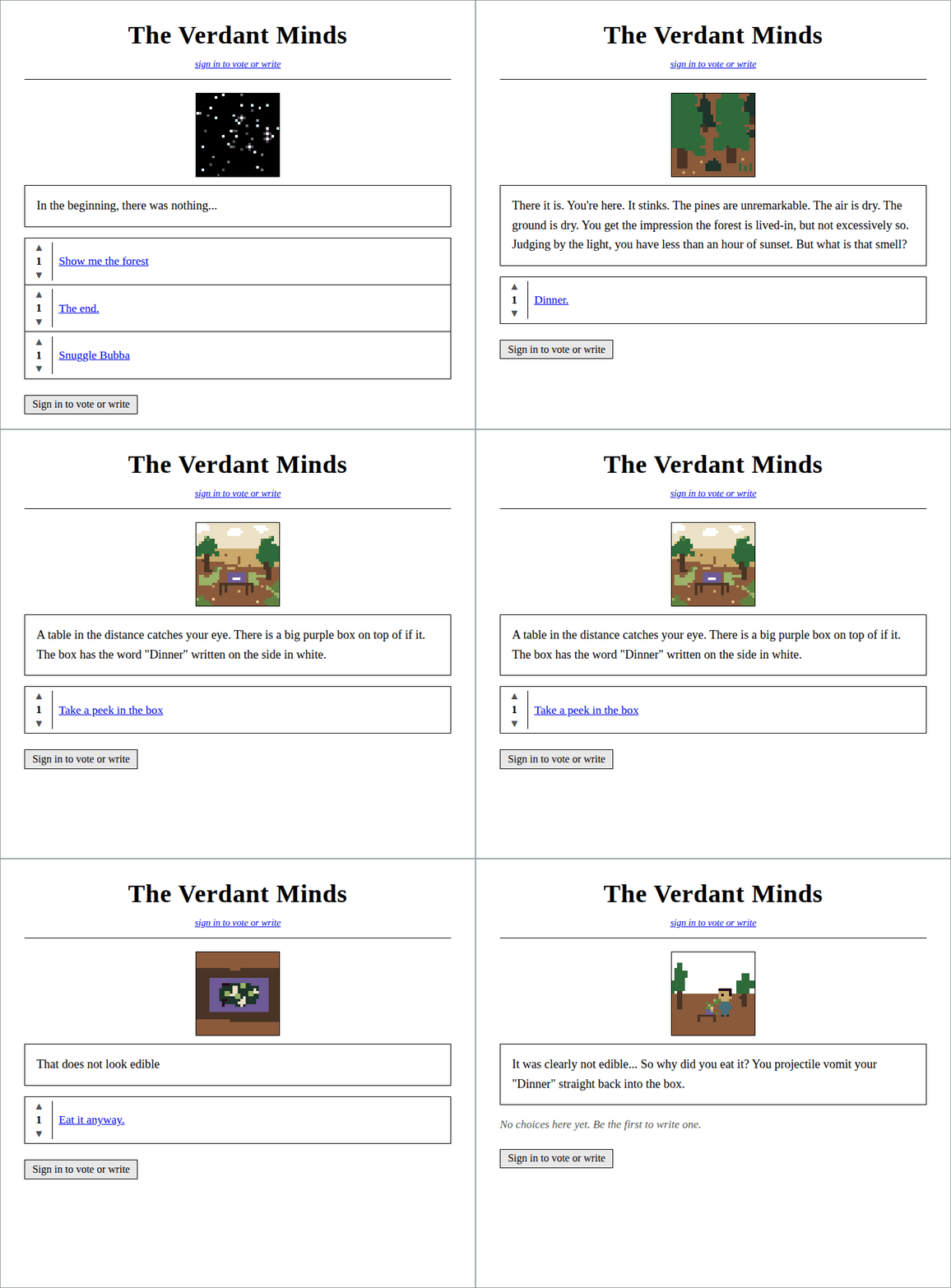
It was basically a choose-your-own-adventure that people could add to. It let you draw little pictures with a limited palette and write little blurbs. It made you sign in so that I didn’t get bombed by bots. It also had some voting that ordered the choices. It was a very simple app.
The architecture
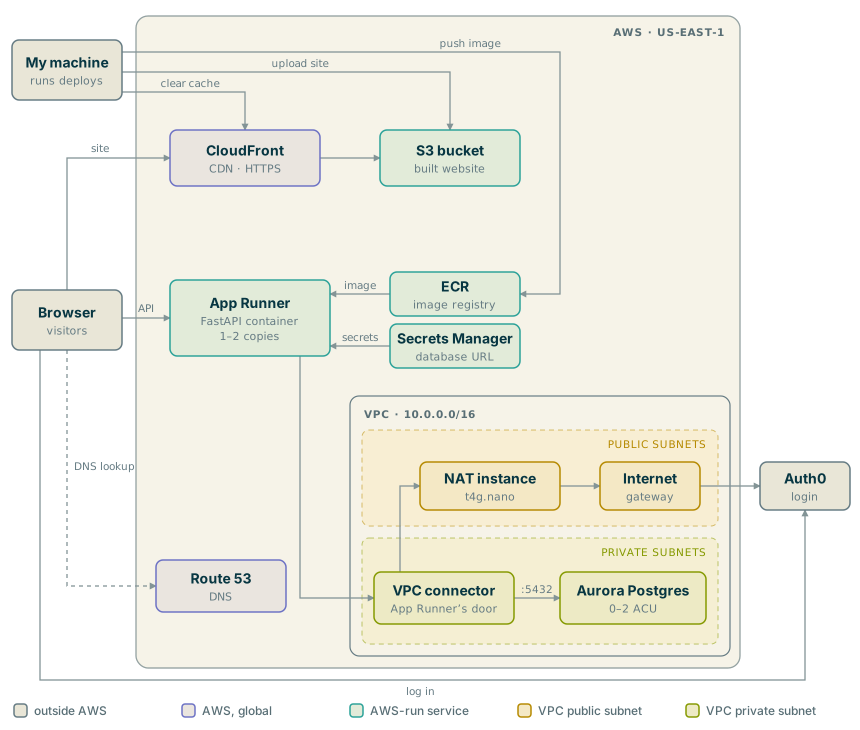
I’m not gonna pretend to have an expert understanding of this architecture, but here’s a mostly claude-slopped summary that I’ve touched up.
The website itself is static: a React app sitting in an S3 bucket, served through CloudFront. The backend is a single FastAPI container on App Runner, which talks to an Aurora Serverless Postgres database that switches itself off when nobody is using it. Auth0 handles logins. Claude wrote all of it as Terraform, and deploying was two shell scripts run from my machine.
Nuance
You can kind of break the site apart into two parts: the static stuff and the dynamic stuff.
Static stuff
The static stuff is pretty easy. I wrote some react code that breaks down into JS and HTML and whatever else. Your browser can read and render this stuff. I put it in S3 (whose job is basically holding and serving files). You don’t want users to reach directly into S3 to get stuff (Usually safer to keep people away from your S3). CloudFront slaps a nice HTTPS URL on top and does really smart caching to make things cheaper and faster (I think).
Also throwing in Route 53 here which is basically just how I set up the domain and pointed it at the site.
Dynamic stuff
The dynamic stuff (the actual content of the choices, the images, etc.) is slightly more complex. It breaks down into a few parts:
- Authentication (Making users log in)
- Storage
- Modification aka API
Authentication
Yeah, this kinda sucked ass. Basically I just clicked a bunch of buttons on the Auth0 website and pasted things back to claude. Auth0 kind of abstracts away most of the details here, which is nice. But it’s not fully automatable and requires meat to press buttons on their website.
Storage
This is also kind of simple. It’s basically just a little postgres server that AWS offers. Part of the trick is that you really don’t want bad actors fiddling with this, so you wrap it in a VPC that only lets your pre-approved API (to be discussed next) talk to your postgres.
API
So basically we need an API that lets you add/modify/get the user-created submissions. To do this, I made a little backend script that uses FastAPI and has a few endpoints exposed. This becomes an “image” which we publish on ECR. Then we stand up a little app runner that runs this backend and listens for requests. The static frontend can call to this backend asking for user submissions or submitting new stuff.
This app runner is kind of costly since, by design, they are just little computers running 24/7 doing whatever your uploaded image says to do. I saved cost by choosing one that turns off if it’s not used for ~30 minutes. The side effect was that visiting my website would be slow if you hadn’t visited in a while because the app runner needed to turn back on.
Also NAT
Your safe little VPC bubble needs to talk to Auth0, which lives on the internet. Everything in the VPC is basically using private addresses in their little subnet. A NAT is like a home router: it gives them an address on the real Internet. It’s very secure and does not to talk to anyone except Auth0 (with whom it always starts the conversation).
Gluing it all together with terraform
I don’t know anything about terraform and it looks like something Claude should automate. My understanding is that it basically just tells you what to stand up in AWS and how to configure each piece.
I ended up having a directory full of .tf files that looked like this:
# Aurora Serverless v2 (PostgreSQL), private. The DATABASE_URL handed to App
# Runner is built from a self-managed random password (see secrets.tf).

resource "aws_rds_cluster" "aurora" {
  cluster_identifier = "${var.project}-aurora"
  engine             = "aurora-postgresql"
  engine_mode        = "provisioned" # Serverless v2 runs in provisioned mode
  engine_version     = var.aurora_engine_version

  database_name   = var.db_name
  master_username = var.db_username
  master_password = random_password.db.result

  db_subnet_group_name   = aws_db_subnet_group.aurora.name
  vpc_security_group_ids = [aws_security_group.db.id]

  storage_encrypted   = true
  skip_final_snapshot = true # hobby app; no final snapshot on destroy
  apply_immediately   = true

  serverlessv2_scaling_configuration {
    min_capacity             = var.aurora_min_acu
    max_capacity             = var.aurora_max_acu
    seconds_until_auto_pause = var.aurora_seconds_until_auto_pause
  }
}

resource "aws_rds_cluster_instance" "aurora" {
  identifier          = "${var.project}-aurora-1"
  cluster_identifier  = aws_rds_cluster.aurora.id
  instance_class      = "db.serverless"
  engine              = aws_rds_cluster.aurora.engine
  engine_version      = aws_rds_cluster.aurora.engine_version
  publicly_accessible = false
}
Then to actually deploy it I would do something like
cd infra
terraform init

# 1. Create just the image registry. App Runner won't start without an image to run.
terraform apply -target=aws_ecr_repository.backend

# 2. Build the backend image and push it there.
./push-image.sh

# 3. Stand up everything else (network, database, App Runner, S3, CloudFront, DNS).
terraform apply

# 4. App Runner only reveals the DNS records that prove I own the API's domain
#    after step 3, so a second pass creates them.
terraform apply -var manage_api_cert_validation=true

# 5. Build the frontend and upload it to S3.
./deploy-frontend.sh
I also had scripts to build and push the frontend but those are boring.
So what did it cost?
I ran it for a few months. Here’s July:
| What | Cost (USD) |
|---|---|
| Public IPv4 addresses (the NAT’s) | 7.44 |
| App Runner | 7.21 |
| NAT instance | 6.25 |
| Aurora database | 1.23 |
| Secrets Manager | 1.20 |
| Disks | 0.32 |
| S3 + ECR | 0.02 |
| CloudFront | 0.00 |
| Total | 23.68 |
That’s actually two copies of everything, because I reused the same Terraform for a second app that ran at the same time. So one app was roughly half: about 12 dollars a month.
Not bad. Probably had like 10 users max, most visited once. It cost very little when no one was using it due to the app runner being smart and turning itself off.
Worst case: What could it have costed?
So the gold standard here is that you set budget alerts on AWS that show when you’ve hit X dollars, where X is a number that makes you panic. This should let you recognize if something is wrong and kill the whole system.
However, I was curious what would happen if a bad actor tried to ruin me while I was out sailing on the mediterranean for a week, so I asked Claude to do some napkin math:
Claude-slopped estimates
Assume someone spends the whole week (168 hours) trying to run up the bill, and AWS charges its list prices:
| Attack | Capped? | Worst week (USD) |
|---|---|---|
| Flood the API | Yes: App Runner stops at 2 copies | about 20 |
| Keep the database busy | Yes: Aurora stops at 2 ACU | about 40 |
| Spam new pages | Rate limited, and each page is about 1 KB | about 0 |
| Attack the NAT | Can’t reach it from outside | 0 |
| Download the site over and over, from one 1 Gbps connection | No | about 5,500 |
| The same, from a botnet doing 10 Gbps | No | about 33,000 |
| Look up made-up subdomains, 10,000 per second | No | about 1,400 |
The caps did their job. Everything behind the API tops out around 60 dollars for the week: once App Runner is running its two copies, it starts refusing requests, so the site goes down but the bill stops growing.
The hole is the static side. CloudFront has no cap. It will serve the site’s 430 KB JavaScript file as many times as anyone asks, at about 8 cents per GB after the first free terabyte. One person with a gigabit connection can pull about 75 TB in a week, which comes to roughly 5,500 dollars. At 10 Gbps it’s around 33,000, which is basically the horror-story bill. Route 53 is similar on a smaller scale: it charges per DNS lookup, and lookups for made-up subdomains skip every cache along the way.
The budget alert would have emailed me within hours, but it doesn’t turn anything off, and I’d have been on a boat. Realistically, nobody spends a week and a botnet attacking a choose-your-own-adventure with a handful of users, and AWS has a reputation for forgiving attack bills if you ask. But the real exposure was the boring static half, not the scary backend.
Human-slopped reflection
That’s crazy. I should have done that math before hosting this. I think I actually left it running while I was on vacation.
I would probably host something like this again, but you want to be really careful not to lose track of it, because it makes you vulnerable. In retrospect, I’d probably set up some kind of claude job to keep an eye on it and kill everything if anything looks funny.
Conclusion
AWS is cool. Like always, nobody actually used my stuff, but they could have. It’s surprising how much complexity there is behind little tiny baby apps like these.
I am very glad I had Claude to help me through this. I like learning about how this all works, but I don’t think I would enjoy writing terraform. I also think this helped me wrap my head around AWS when I was getting started with my new job. AWS was honestly pretty new to me.
I thought this project was a pretty good use case for Claude. I’d be interested to hear if someone out there disagrees.
Thanks for reading!
Post-script: Blogging in the post-claude era
I wrote pretty much all the text that’s not in figures/diagrams here. But I have been experimenting with new blogging techniques. I basically start sketching the blog then put stuff like
{claude put a gif of the storytime app here to show how it worked}
or
{make a diagram of the AWS architecture from storytime}
or
{grab the cost data from aws and make a table for one month here}
and then I have claude do a pass over the article and fill that stuff out. I make sure to contain slop language to passages which are clearly marked as AI.
This has made blogging much more pleasant, honestly. Debatably, I’m outsourcing the actual showmanship, but I’m not sure that really matters. I don’t have an audience. This is basically a time capsule so that I can embarass myself in the future. But it’s an interesting cost analysis when I have no audience, no profit motive, no clear goals. I am just compelled to write slop posts, and I do not want to generate gifs from screenshots using ffmpeg or some shit like that.
Anyways, thanks again for reading!